

ARIZONA HANG GLIDING AND PARAGLIDING ASSOCIATION


RealTime Tracking with FlyXC.app
Our club uses FlyXC.app to track pilots during flights. It gives us a live map showing where everyone is and their altitude, which helps with coordination, safety, and retrieves.
FlyXC can pull tracking data from different sources, each with pros and cons:
-
Apps like XCTrack or FlySkyHy can send frequent updates (every minute). To appear on FlyXC, these apps need to be linked to your XContest account, which FlyXC uses as a data source. This setup requires cell coverage during the flight.
-
GPS trackers like Garmin InReach use satellites to send your location, typically every 10 minutes. They work even without cell service, but the updates are slower.
The best setup is to use both: your tracking app (via XContest) for frequent updates when you have signal, and a Garmin or similar device as a backup to stay visible in remote areas. FlyXC.app will automatically which data source will be used.
If you need help getting your setup connected, feel free to reach out.


Step 2
Sign in using google

Step 3
Enable InReach option

Step 4
Click on your Inreach social Profile

Step 5
Login to your garmin profile

Step 6
Click on MAPSHARE

Step 7
Make sure MapShare is enabled and copy the link to your mapshare

Step 8
Paste your MapShare back into flyxc.app and click on save

Step 9
Open XCTrack and enter your preferences

Step 10
Click on pilot to enter XContest login information

Step 11
Enter your login information for XContest

Step 12
Go into livetracking Settings to enable livetracing.


Step 14
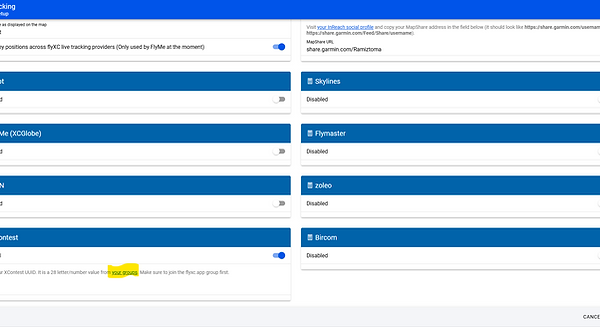
Click on your groups
Step 15
login in to your XContest account, and click on Yes, Enter

Step 16
Copy your UUID


Step 18
At this point you have configured your account with FlyXC.app to use both your InReach and your phone to update your location. You will need to wait 15-20 minutes then turn on your garmin and turn on the tracking. Wait another 20 minutes then go to FlyXC.app to view if your name pops up on the map.
Step 2
Sign in using google
Step 3
Enable InReach option
Step 4
Click on your Inreach social Profile
Step 5
Login to your garmin profile
Step 6
Click on MAPSHARE
Step 7
Make sure MapShare is enabled and copy the link to your mapshare
Step 8
Paste your MapShare back into flyxc.app and click on save
Step 9
Open FlyskyH and click on settings

Step 10
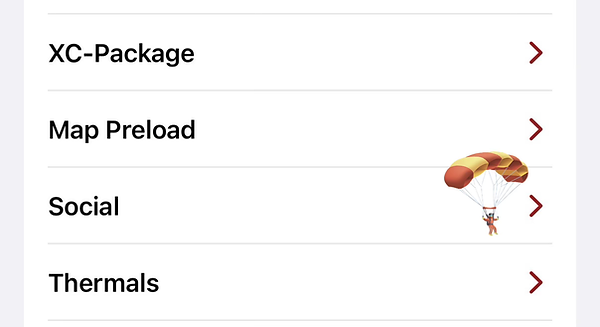
Click Social
Step 11
Will need to purchase social extension and

Step 12
Go back to settings and click on Pilot and Glider

Step 13
Select XContest

Step 14
Enable Livetracking

Step 15
Enter you login details for XContest

Step 17
Click on your groups
Step 18
login in to your XContest account, and click on Yes, Enter
Step 19
Copy your UUID
Step 21
At this point you have configured your account with FlyXC.app to use both your InReach and your phone to update your location. You will need to wait 15-20 minutes then turn on your garmin and turn on the tracking. Wait another 20 minutes then go to FlyXC.app to view if your name pops up on the map.
FlyXC check in messages with InReach
You can send in check in messages that will show on FlyXC.app. This is useful to send prior to launching and once landed safely. They are not automatically sent, you must send them as check in messages on your InReach device

Step 2
Click on Messages tab

Step 3
Check-in Messages are not editable but you must select MapShare to send them to FlyXC

Best Practices for communications

Tracking Fellow Pilots Mid-Air
If you're using a flying app that supports live tracking through XContest (such as XCTrack, FlySkyHy, or others), and your app is properly linked to your XContest account, you’ll be able to see other pilots in the air who are also connected and tracking through XContest.
Their positions will show up on your in-flight map, updating in real time as long as there’s a data connection. This can be really helpful for:
-
Staying aware of nearby pilots
-
Finding lift by watching others’ positions
-
Regrouping or flying together mid-flight
To use this feature, just make sure:
-
Your app is connected to your XContest account
-
You have mobile data available during flight
It’s a great way to stay connected with the group, improve situational awareness, and make flying more as group.
